
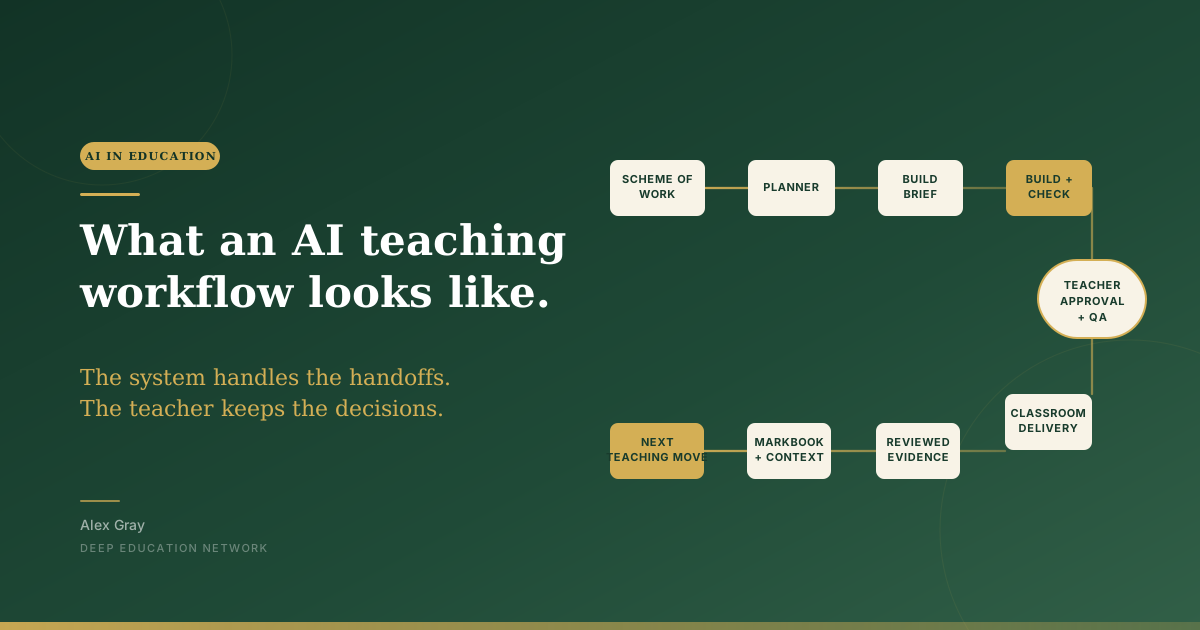
AI becomes more useful when the route from curriculum to classroom is clear: each record has a home, each handoff has a check, and the teacher keeps the decisions.
Most conversations about AI in schools start with the prompt.
What should I ask it? Which tool should I use? How do I get a better worksheet out of it?
Those are useful questions. They come later.
The first question is simpler: where does this piece of work live, who checks it, and what happens when the lesson is over?
That is what I mean by a workflow. It is not a fancy app or a giant new system. It is a clear route from the curriculum to the classroom, with a few sensible boundaries along the way.
AI can help at particular points in that route. It can help turn an approved brief into a first draft, check that a file follows the format, or pass information from one agreed place to another.
It does not get to decide the route.
A workflow is a way of avoiding the familiar mess
Think about a normal planning job.
You find the scheme of work. You look at last lesson's notes. You make a slide deck. You write a worksheet. Then you make a teacher version because you need the answers. A colleague asks for a copy. You adjust it for a class that needs more support. A week later, somebody is working from the old version and nobody can remember which file is right.
None of that is a failure of effort. It is what happens when one job has no agreed route.
An AI tool can make this worse very quickly. It will happily produce another version of the worksheet, another answer key and another summary. If there is no clear home for each of them, it adds speed to the confusion.
The point of a workflow is to give each thing one home and one job.
In EduOS, the scheme of work owns the curriculum sequence. The planner owns the teaching plan. The pupil-facing lesson lives separately from the private teacher companion. Assessments keep their own record. We link those records with stable IDs instead of copying the same material into five places.
That sounds a little dry. It makes a practical difference. When you need to correct a source, update a model answer or check what students were actually given, you know where to look.
What it looks like in practice
Here are three ordinary examples.
1. Planning a real lesson: the Year 8 practical
EduOS has a four-lesson Year 8 sequence on investigating magnesium and hydrochloric acid. That makes a good example because the teaching is not only a set of slides. It has a practical route, a fallback if the practical cannot go ahead, and retained evidence at the end of the sequence.
The scheme of work tells us the destination. The planner holds the lesson's place in the sequence. Before any slides or worksheets get built, the build brief asks:
- What do students already know?
- What misconception are we trying to address?
- What will they do that lets us see whether they understand?
- What do we still need to decide?
Only once those questions are clear does the system build the resource set: the pupil-facing lesson, a separate private teacher companion, a source-and-QA note, and any practical or assessment materials needed.
Then comes a useful distinction. A file existing is not the same as a lesson being ready. EduOS checks the curriculum link, the learning design, the public/private separation, the screen fit and the classroom reality. The teacher still decides whether the practical is safe, resourced and right for this class. If it is not, the prepared-data fallback becomes the route instead.
AI can help with a first draft, a hinge question or a clearer explanation. It does not get to quietly choose the practical, hide the answer key in the pupil lesson, or mark a resource ready.
2. Looking at a set of responses
The same principle matters more when the work becomes an assessment.
The teacher opens an approved assessment package for the intended coded class. Pupils enter using an activity code and their numeric code, not their name. When the response window ends, the teacher locks submissions and reviews every response. Any AI suggestion stays private draft material, never the final mark or feedback.
Only after the teacher has confirmed the judgements do they deliberately release feedback. The pupil gets one clear next action — what to improve, how to do it and what success looks like — rather than a score appearing without a route forward.
After that, the teacher previews the reviewed result before it reaches the Markbook. If even one row is rejected, the process stops to fix the mismatch; it does not overwrite the teacher-owned file. The useful output is not just a score. It is a checked pattern the teacher can use for a five-minute re-teach, tomorrow's starter or the next retrieval task.
3. Building a shared department resource
Suppose two Year 7 classes are following the same opening sequence.
Without a system, it is tempting to make two copies of every file — one for each class — and then both copies drift. EduOS plans once at lesson-definition level, then schedules it for each class. The shared lesson remains one checked resource; class-specific changes such as a missed lesson, homework or rescheduling belong to the class instance.
That means a teacher can see what is shared and what is genuinely different, without pretending the classes are identical. AI can help draft a practice activity, but it should not silently become the source of truth. The department still owns the curriculum, the accuracy check and the final release.
The three lists that slow down the right moment
Every EduOS build starts with three lists:
| Before the build | What it means |
|---|---|
| Found | What the curriculum, source material or existing records already tell us |
| Assumed | What the system is inferring and the teacher needs to check |
| Still needed | What is missing before a sensible resource can be made |
This is the part I would borrow even if you never build anything called an operating system.
It takes a minute. It also stops a familiar problem: a polished resource appearing before anyone has agreed what it is supposed to teach.
If you are using AI to make a lesson, ask it to show those three lists first. Read them. Correct them. Then approve the brief before it creates the slides, questions or handout.
You have not added bureaucracy. You have moved your judgement to the point where it still changes the work.
Keep the boundaries visible
The system also needs a few rules that are easy to see and easy to follow.
Pupil names and the code-to-name key stay outside EduOS, AI prompts, recordings, logs and source control. The workflow uses anonymous pupil codes only.
Teaching knowledge has a home too. EduOS uses teaching and learning cards: one idea per card, with what it is, when to use it, when to avoid it, classroom moves, a worked example, common pitfalls and named sources. The cards have controlled tags so the system can find the right kind of idea for a particular lesson.
That does not make the tool wise. It gives it a bounded set of evidence the teacher chose and can inspect.
Do not make AI a default part of a lesson. Use it when it strengthens the subject learning, or when pupils are learning to evaluate it. The system can prepare, organise and suggest; the teacher still decides what is accurate, appropriate and needed next.
Start with one routine this week
You do not need to rebuild your whole school drive.
Pick one repeatable job this week. It could be planning a lesson, preparing a revision resource or looking for patterns in exit tickets.
Give it one clear home. Keep the student and teacher versions separate. Ask for the Found, Assumed and Still needed lists before you ask AI to make anything. Then decide what needs your approval before the work moves on.
That is enough to make the workflow visible.
If you would like to try this with your own teaching this week, Back to School AI runs from 24 to 28 August. There are five live ninety-minute sessions, $10 each, and every session is recorded. We will use AI for real planning, thinking, building, learning and leadership work, while keeping the teacher in charge of the decisions that matter. Join Back to School AI.
The prompts will still matter. They are just not the first thing to fix.
Filed under

Stay in the Loop
Get practical insights about AI in education, new articles, and training updates delivered to your inbox.
No spam. Unsubscribe anytime.
Work With Alex
Looking for hands-on support with AI integration, curriculum design, or teacher professional development? Alex works with schools and organisations worldwide to build practical, evidence-informed approaches to education technology.