

Set up this practical ChatGPT marking workflow before term starts: automate the repetition while keeping diagnosis, context and professional judgement with the teacher.
The books are closed for summer. In a few weeks, marking will be two jobs again.
There's the mechanical half. Thirty short answers that each need a targeted comment, the same misconception surfacing in the same three places, the sentence you've typed forty times since September. And there's the judgement half. The one essay that's stuck, where the grade is easy and the reason isn't, and where what you write next actually changes what the student does.
ChatGPT can take the repetitive half off your plate when term starts. The risk is giving it the second half by accident, because we give it the whole pile and let it sort itself.
This is a workflow to set up before the first pile lands. The point isn't to automate the care out of feedback. It's to protect teacher time and energy while giving students feedback that helps them improve and still feels human — because a teacher still read the work and made the judgement.
What changed last Thursday
On 6 August OpenAI updated the controls in ChatGPT. It's a small change and it happens to be the one that matters for marking.
If you're on Plus or Pro, there's now a reasoning slider inside the model picker. Instant gives you GPT-5.5 Instant. Medium gives you standard reasoning with GPT-5.6 Sol. High gives Sol more reasoning effort. Above High, Pro users also get Extra High, while the Pro setting uses GPT-5.6 Sol Pro. Neither is available on Plus.
Three things about that are worth knowing, because most of the coverage I've read this week gets them wrong.
You can't switch between Sol, Terra and Luna in an ordinary ChatGPT conversation. GPT-5.6 comes in three tiers, but OpenAI says Terra and Luna are not selectable in standard ChatGPT conversations. Here, you're choosing reasoning effort rather than choosing between the GPT-5.6 models.
If you're on Free or Go, Sol isn't available. Luna is becoming the default there, and OpenAI says a Think button for harder questions starts rolling out this week. Think still uses Luna, not Sol. If you're on Free or Go, check whether yours has appeared yet.
And max, the deep mode doing the rounds on LinkedIn, belongs to ChatGPT Work and Codex. It isn't another ChatGPT model. It's an effort setting applied after you've chosen the GPT-5.6 model you're working with.
So, for a teacher who'll soon have a pile of books and an evening, the useful decision is remarkably simple: how much reasoning does this piece of work deserve?
Which is good news, because the hard part was never the tool.
The hard part is the sort
When that first pile arrives, split it before you paste anything.
Routine goes in one stack: work where you already know what a good answer looks like, where the criteria do the deciding, and where your value is the speed and consistency of the comment. The deep read goes in the other: work where you're not yet sure what's gone wrong.
Get that sort wrong in either direction and you lose. Point High at thirty routine answers and you've spent the evening you were trying to reclaim. Point Instant at the essay that needs diagnosing and you get something that looks like feedback and tells the student nothing.
The sort is the professional judgement. It takes about ninety seconds, and no setting on that slider makes it for you.
The routine pile
Set the slider to Medium. Before you upload the work, remove names and anything else that could identify a student. Removing the name alone may not be enough if the answer contains distinctive personal details. The DfE's position is straightforward: “it is recommended that personal data is not used in generative AI tools”.
Then ask for a comment bank, not finished marking.
Starter prompt. “Here are thirty de-identified Year 9 answers to this question, and here are my success criteria. Group them by the misconception they show. For each group, draft one comment of no more than two sentences that names the error, points at the specific fix, and uses no praise. List the groups in order of how many students are in them.”
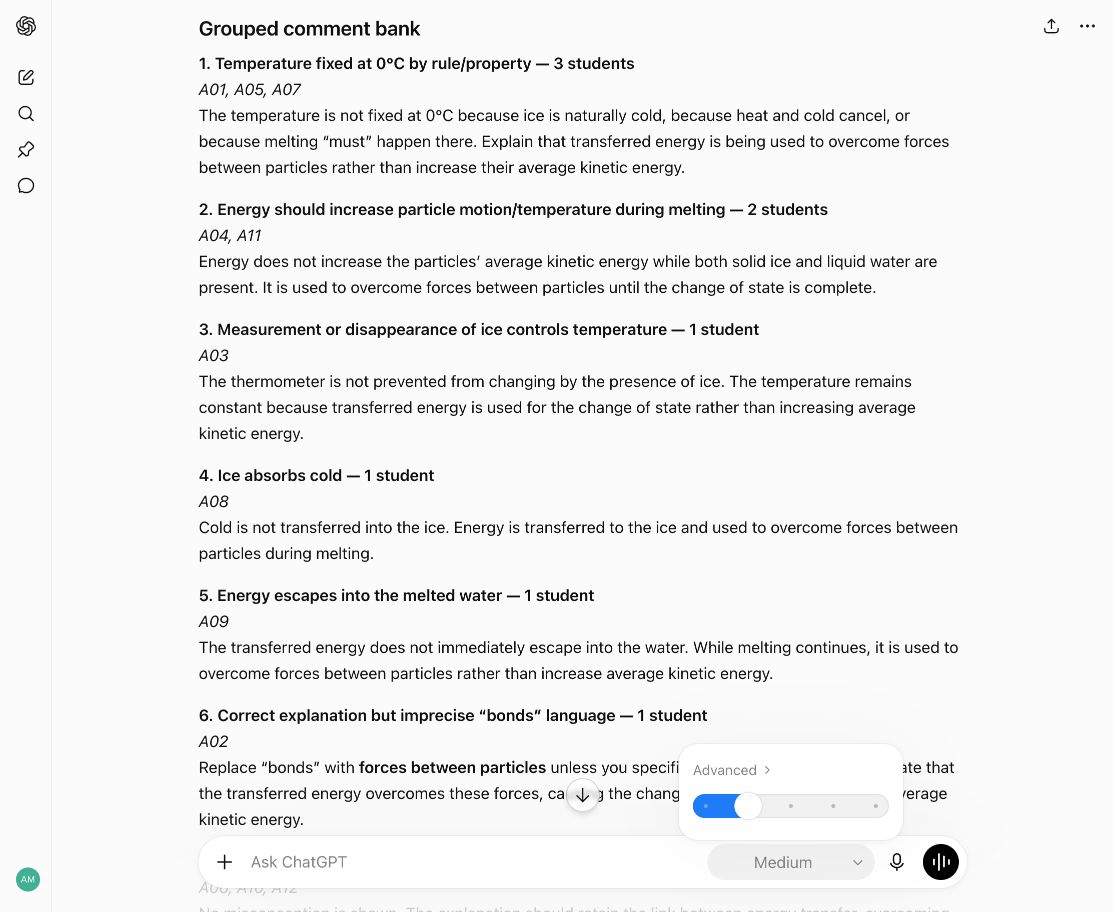
Medium reasoning, with entirely synthetic Year 9 answers grouped into a reusable comment bank.
What comes back is a bank you then match to students, and you'll rewrite some of it. The typing is gone and the consistency is better than a tired Sunday-evening version of me manages. That's all it does, and most nights that's plenty.
Be honest with yourself about what it saves, though, because you still have to read what it produced. Teachers in a 2025 study of AI feedback in English schools kept making that point. One told the researchers it “might save time, but I'm not convinced... because you still need to read it all through yourself to see what the AI has put, and whether or not it has focused on what you want it to focus on for that student as an individual”. I haven't found good evidence that quantifies the real-world time saving yet. Time yourself the first three times you do it.
The stuck essay
Now the borderline piece. Slider to High. Attach the mark scheme, and ask for a diagnosis instead of a grade.
Starter prompt. “This is one de-identified student essay against the attached mark scheme. Don't give me a grade. Tell me where the argument loses its thread, which criterion the writing keeps almost meeting, and what single change would move it. For each judgement, point to the evidence in the student's response and the relevant wording in the mark scheme. Then tell me what you'd need to see in their next piece to know it had worked.”
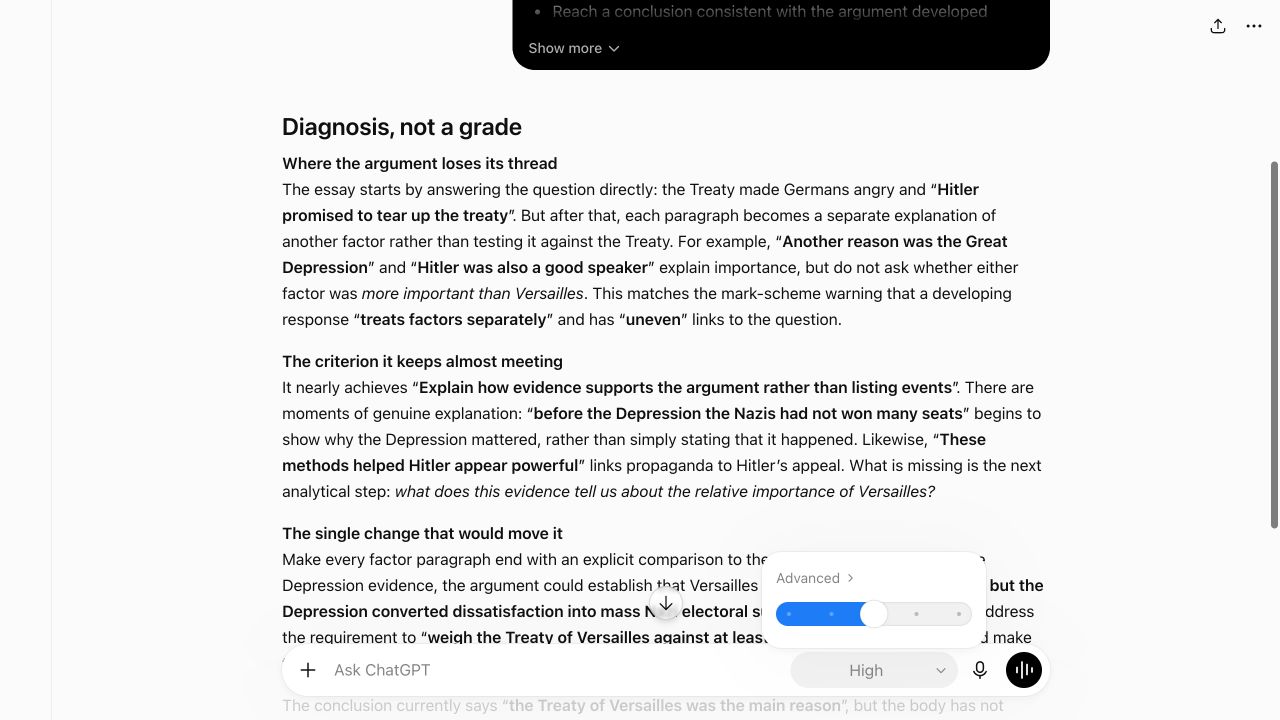
High reasoning, diagnosing an entirely synthetic history essay against a mark scheme without assigning a grade.
The output you want is a theory of why the essay is stuck. You then test that theory against what you know about the student, which is precisely the context the model doesn't have.
Both prompts above are the short version. The ones I actually use are two or three times that length, after a few rounds of correcting the model against my own criteria. The gap between those two is the actual skill. You get there by being more specific and correcting it a few times. There isn't a magic wording that skips the step.
Two checks before you start
First, check which account you're typing into. On a personal ChatGPT account, open Settings → Data Controls → Improve the model for everyone. If that setting is on, OpenAI may use your conversations to improve its models; turn it off before using pupil work. On a school Edu or Enterprise workspace, OpenAI says it doesn't train on your organisation's data by default, and those plans provide organisations with compliance and audit capabilities.
Second, if the work counts towards a qualification, check your centre's policy before doing any of this. JCQ's guidance applies mainly to non-examined assessment, coursework and internal assessment. Centres decide whether teachers may use AI to assist marking, after considering data privacy. Where a centre permits it, JCQ is direct: “An AI tool cannot be the sole marker. A human assessor must review all the work in its entirety and determine the mark it warrants.”
Ofqual's January position concerns high-stakes qualification marking: “AI is promising for quality assurance and marker training, but for the moment it's nowhere near ready to take over high stakes marking”. Your Tuesday book scrutiny isn't that, and neither body is setting policy for routine classroom feedback. Different context, same underlying principle: AI can assist the judgement; it shouldn't replace the person responsible for it.
What stays yours
Three things, and they don't shrink.
Which pile is which. The model will mark either one. Deciding which essay is routine and which needs the slow look is the judgement the entire workflow rests on.
Whether the feedback is true. A comment bank drafted against your criteria is a draft. You know the class, the prior work, the student who needs the hard version and the one who needs it gentler that week. That context is what turns a plausible comment into useful feedback.
That someone read it. I'd protect this one most. The same teacher in that study put it better than I can: “so many students want you to read their work... If they thought that you were just going to run that through an AI marker, I think their investment in that is gone.” The model can draft and group; the teacher still reads, checks and decides what the student needs next. That isn't theatre. It's the human part of feedback.
Take the study for what it is. It's small and qualitative: twelve teachers and nine students. The authors say plainly that it doesn't generalise, and the researchers deliberately recruited teachers with little experience of AI. It still describes something every teacher recognises.
Don't rebuild your whole working week around this, though. In the DfE's latest Working Lives survey, 38 per cent of teachers and middle leaders said they spent too much time marking — the lowest figure in the series. Seventy-one per cent said the same about general administration. Marking is a real load, and it isn't the biggest one.
So, before term starts: save the two prompts, check your account and your school's policy, and decide what belongs in each pile. When the first work comes in, run the routine half at Medium and keep the essay you can't see into for yourself. The sorting is the teacher's job. It takes about ninety seconds. Get that right and the rest goes quicker, without handing over the judgement that matters.
The win isn't more marking squeezed into an evening. It's getting some of the evening back while students still receive feedback worth acting on — from a teacher who knows them.
AI can do a lot of the marking. It shouldn't decide which marking needs you.
Back to School AI runs 24 to 28 August: five evening sessions, ten dollars each, all recorded. deepeducationnetwork.com/back-to-school
Sources
- OpenAI, Improving GPT-5.6 Sol in ChatGPT, and expanding access to GPT-5.6 Luna for free users, 6 August 2026 — the reasoning slider, Plus and Pro.
- OpenAI Help Centre, GPT-5.6 in ChatGPT — slider settings, plan availability table, “Terra and Luna are not selectable in standard ChatGPT conversations”, Think button timing.
- OpenAI, GPT-5.6, 9 July 2026 — the three tiers, and max as a ChatGPT Work and Codex setting.
- OpenAI Help Centre, Data Controls FAQ — “Improve the model for everyone”.
- OpenAI, Enterprise privacy — no training by default on Edu, Enterprise and Business data.
- Ofqual, Using AI in marking: why technical capability, fairness and transparency all matter, 14 January 2026, and the accompanying working paper. The quoted sentence is from the blog post.
- JCQ, AI Use in Assessments, revision two, 30 April 2025. Scope is mainly non-examined assessment, coursework and internal assessment.
- Department for Education, Generative artificial intelligence (AI) in education, updated 12 August 2025.
- Doyle, Nash, Jakcsiova and Turner, “They want You to Read Their Work”: Teachers' and Students' Perspectives on the Use of AI for School Feedback, Technology, Knowledge and Learning, 30(4), published online 14 October 2025. Twelve teachers from nine schools in England and nine students aged thirteen to seventeen; both quotations are from the same secondary teacher. Qualitative, and the authors state it does not generalise.
- Department for Education, Working Lives of Teachers and Leaders, wave 4, fieldwork 28 January to 6 May 2025. The 38 per cent figure is teachers and middle leaders in England's state schools, n=8,434. The survey asks senior leaders no marking question, so they fall outside that figure.

Stay in the Loop
Get practical insights about AI in education, new articles, and training updates delivered to your inbox.
No spam. Unsubscribe anytime.
Work With Alex
Looking for hands-on support with AI integration, curriculum design, or teacher professional development? Alex works with schools and organisations worldwide to build practical, evidence-informed approaches to education technology.